4.9/5
4.9/5  HotelTechReport - with +970 verified reviews

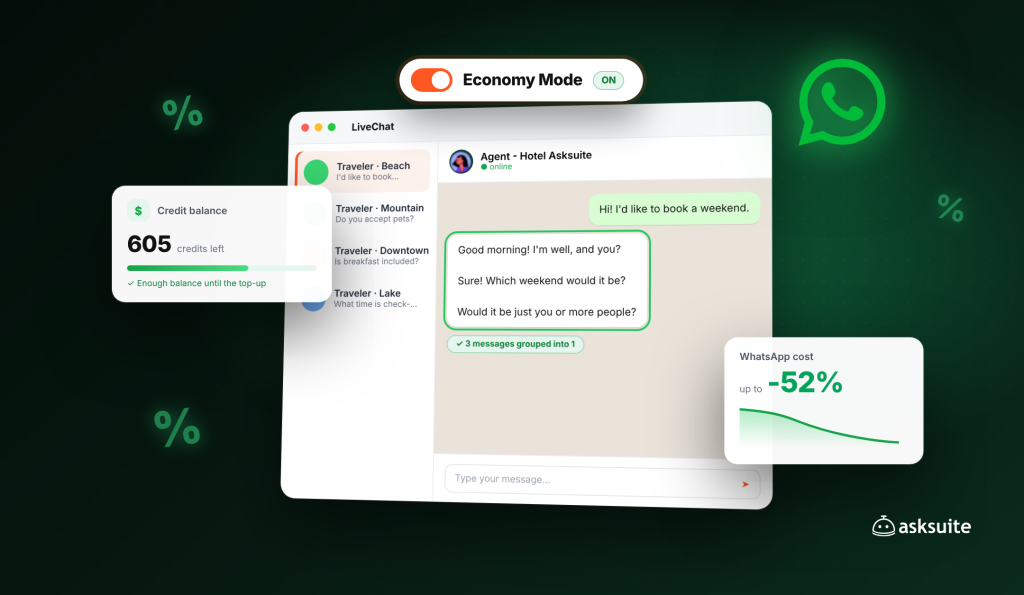
Ao longo de 2026, a Asksuite trabalhou incansavelmente para reduzir os custos do seu hotel com o WhatsApp. Desde que a Meta anunciou a nova tabela de preços para mensagens de serviço em julho, nossa equipe de Produto lançou uma série de melhorias para que você gaste menos nesse canal sem perder a qualidade do serviço oferecido aos viajantes.
O resultado é uma redução de até 52% nos custos do WhatsApp , com recursos gratuitos para clientes Asksuite, muitos deles já ativados por padrão.
A lógica por trás de todas elas é simples: como cada mensagem enviada tem um custo, a melhor maneira de economizar é compartilhar as mesmas informações com o viajante usando menos mensagens , tanto nas respostas da IA quanto nas conversas da sua equipe.
Neste artigo, você conhecerá cada melhoria, verá como ela reduz seus custos e encontrará estratégias de canal para economizar ainda mais.
Por que cada mensagem importa?
A partir de 1º de outubro de 2026, a Meta cobra pelas respostas que um hotel envia a um viajante sem um modelo predefinido, mesmo dentro do prazo de 24 horas. O tamanho da mensagem não importa, nem se a resposta vem de uma IA ou de um membro da equipe: o custo depende da quantidade de mensagens enviadas.
Algumas mensagens ainda não têm custo adicional: as que os viajantes enviam, as primeiras 1.000 mensagens de serviço por mês em cada número e as conversas iniciadas por anúncios Click-to-WhatsApp, durante 72 horas.
Cada mensagem de serviço utiliza apenas uma fração do crédito Asksuite, e o valor exato depende do país do número de telefone do viajante. Lembre-se também de que as 1.000 mensagens gratuitas da Meta não são um depósito de crédito. Elas não são adicionadas ao seu saldo e não podem ser usadas para campanhas de marketing.
Como o Asksuite ajuda você a enviar menos mensagens?
O Modo Econômico é a base dessas economias. Ele funciona em ambos os lados do seu serviço, IA e sua equipe, agrupando o conteúdo para que você diga a mesma coisa em menos envios.
O Modo Econômico já está ativado por padrão para clientes que não o configuraram. Você pode ajustar cada opção ou até mesmo desativá-lo em WhatsApp > Otimizações.
Em média, o Modo Econômico reduz em 40% o aumento de custos decorrente da nova precificação. Combinado com as estratégias de canal que abordaremos mais adiante, essa redução pode chegar a 52%.
1. Modo econômico para sua equipe
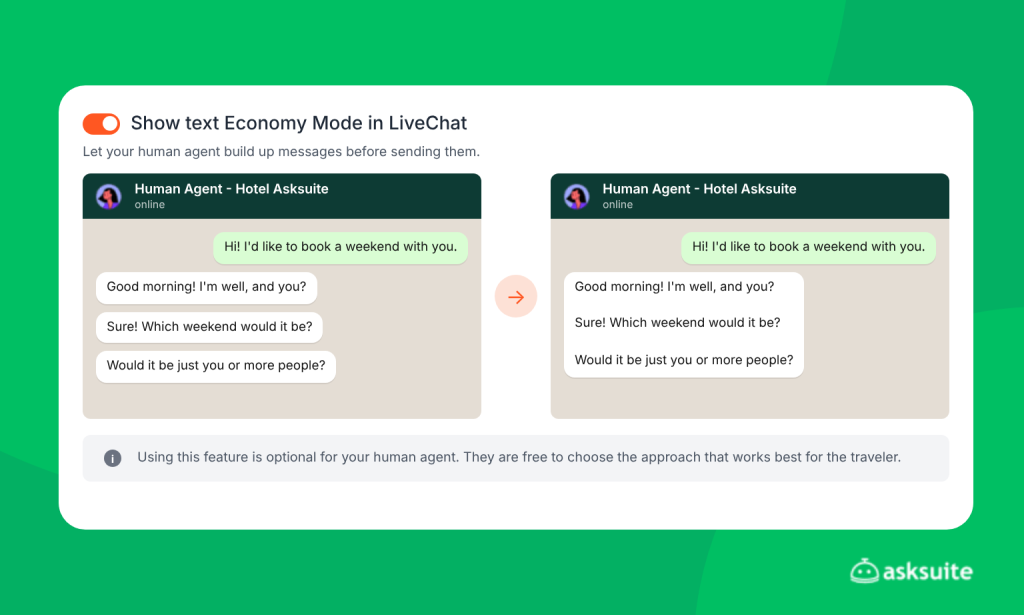
É muito comum que os atendentes dividam uma resposta em várias mensagens curtas: um “Olá!”, seguido da informação e, por fim, uma pergunta. Isso parece natural no WhatsApp pessoal, mas agora cada uma dessas mensagens tem um custo. O Modo Econômico do LiveChat resolve isso sem que sua equipe precise mudar a forma como escreve.
a) Agrupamento de mensagens: o agente escreve as mensagens uma após a outra, como de costume, e elas formam uma fila. Antes do envio, ele pode editar, reordenar e escolher espaçamento simples ou duplo. Tudo é enviado como uma única mensagem. Na prática, uma troca de mensagens que antes receberia 7 mensagens agora recebe apenas 1 ou 2.
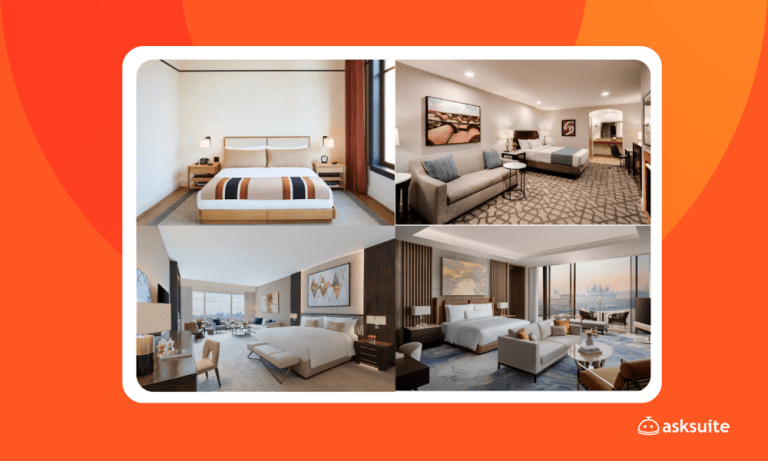
b) Agrupamento de imagens: se você precisar mostrar 4 fotos de café da manhã, o sistema as combina em uma única colagem, lado a lado ou empilhadas. Assim, 4 mensagens se tornam 1.
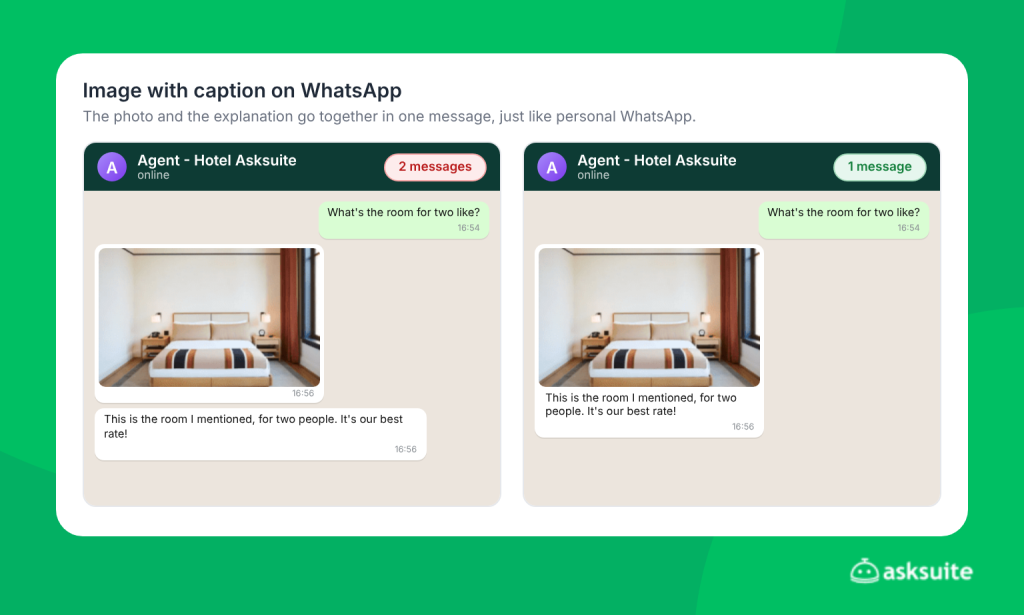
c) Imagem com legenda: o agente envia a imagem e o texto juntos em uma única mensagem, assim como no WhatsApp pessoal. Antes, a foto e a explicação eram enviadas separadamente e contavam como duas mensagens.
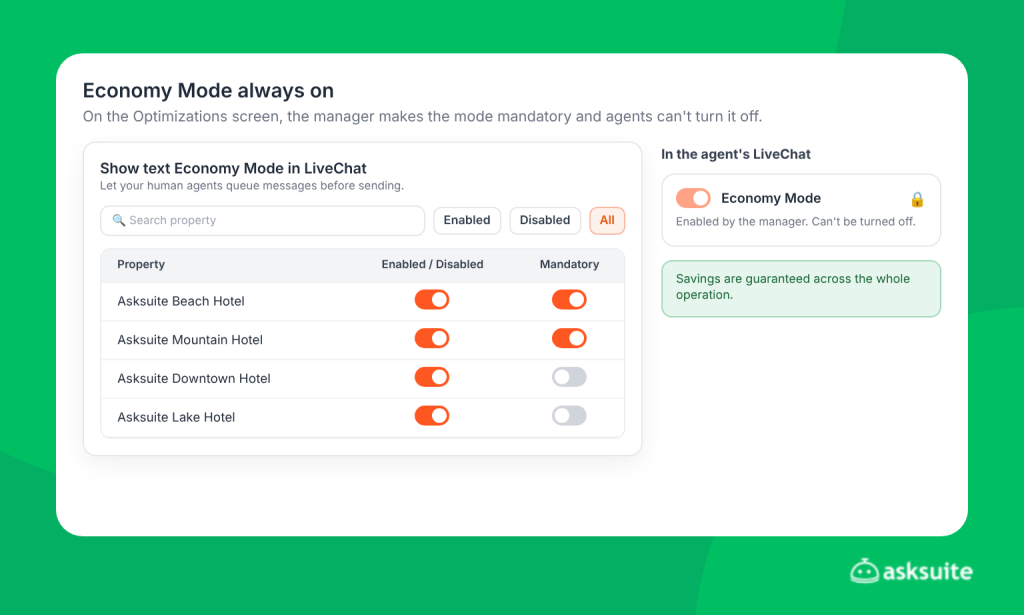
d) Modo Econômico sempre ativado: os gerentes podem bloquear o modo para que ele permaneça ativado o tempo todo, diretamente da tela de Otimizações do WhatsApp. Com o bloqueio ativado, os agentes não podem desativar o modo, e a economia é garantida em toda a operação. Veja como o Modo Econômico funciona para sua equipe .
2. Modo econômico nas respostas de Sophia
Sophia também ganhou novas maneiras de responder com menos mensagens, sem perder a clareza para o viajante.
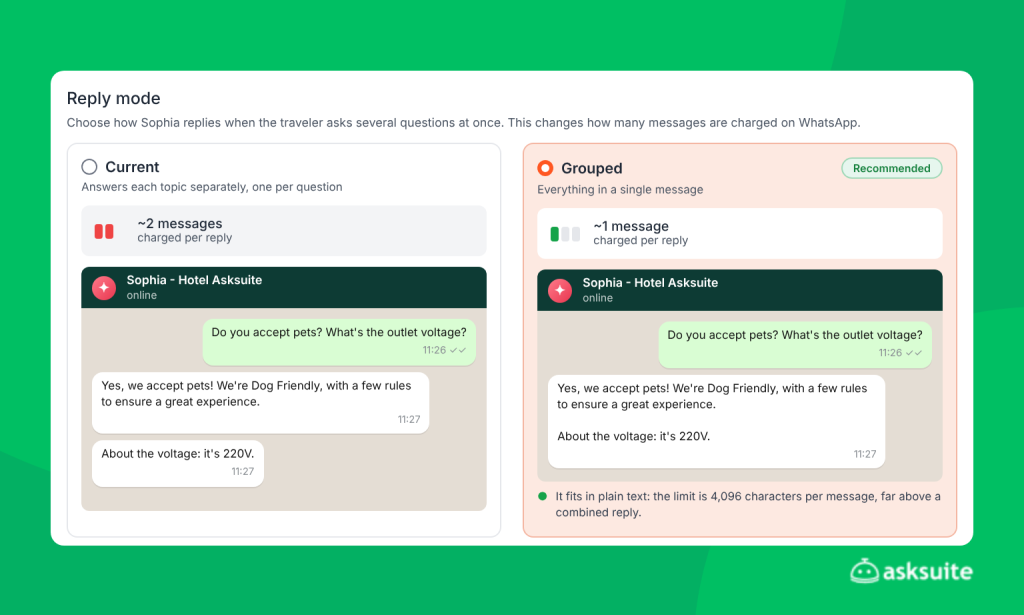
a) Respostas agrupadas: quando um viajante faz várias perguntas na mesma mensagem, por exemplo, sobre café da manhã, estacionamento e horário de check-in, Sophia responde a tudo em uma única mensagem, em vez de uma resposta para cada pergunta.
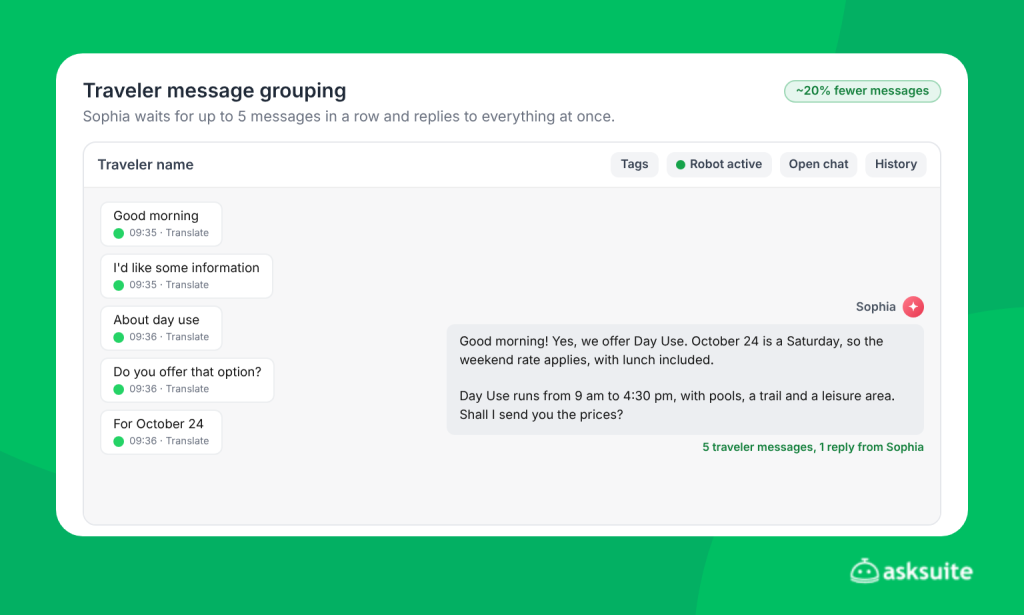
b) Traveler message grouping: many people write on WhatsApp in several short messages. Now Sophia waits for up to 5 messages in a row, with up to 15 seconds between them, and replies taking everything into account at once. With Economy Mode on, that reply goes out as a single message. On average, clients now send 20% fewer messages with this feature, which is already on for everyone using Sophia. Learn how message grouping works.
c) Carousel as PDF: carousels with more than one option, such as packages, leisure areas or units in a hotel chain, are automatically converted into a single PDF. Each option keeps its title, description, image and link button.
See how Sophia’s Economy Mode works.
3. Quotes as a PDF or a single image
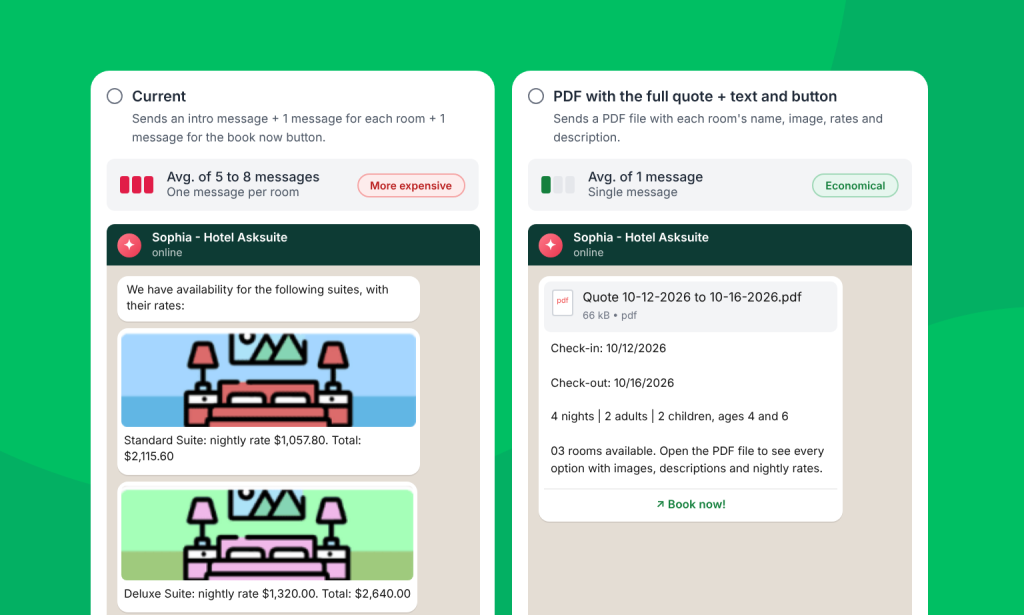
In the traditional format, each room option in a quote is sent as a separate message. A quote with 4 rooms therefore generates at least 4 messages.
With Economy Mode, the quote can be sent as a single PDF with every option, including images, details and buttons that take the traveler straight to the booking engine to complete the reservation. Another option is a single image, with up to 6 photos, a summary and a booking button.
The PDF can also carry your hotel’s identity. You add your logo and write a header and footer with policies, notices or a welcome message, in Portuguese, Spanish and English. The right language is applied automatically for each traveler. This avoids extra messages just to share that information. See how to customize the quote PDF.
In LiveChat, you can also set which quote format your team uses: standard, image or PDF. That way every quote follows the same standard, and agents don’t have to choose each time.
How did quotes get leaner?
The quote is one of the most message-heavy moments in a conversation. Between the traveler’s intent and the room options, there are several steps: introduction, data collection, confirmation and the “searching” notice. Every step that generates a separate message is an opportunity to save.
That’s why Sophia’s quotes got specific adjustments, in both the form and the conversational formats.
In form-based quotes
You can combine the introduction message with the form, skip the data confirmation and skip the notice that Sophia is searching for options. That’s up to 3 fewer messages per quote, without the traveler missing any important information.
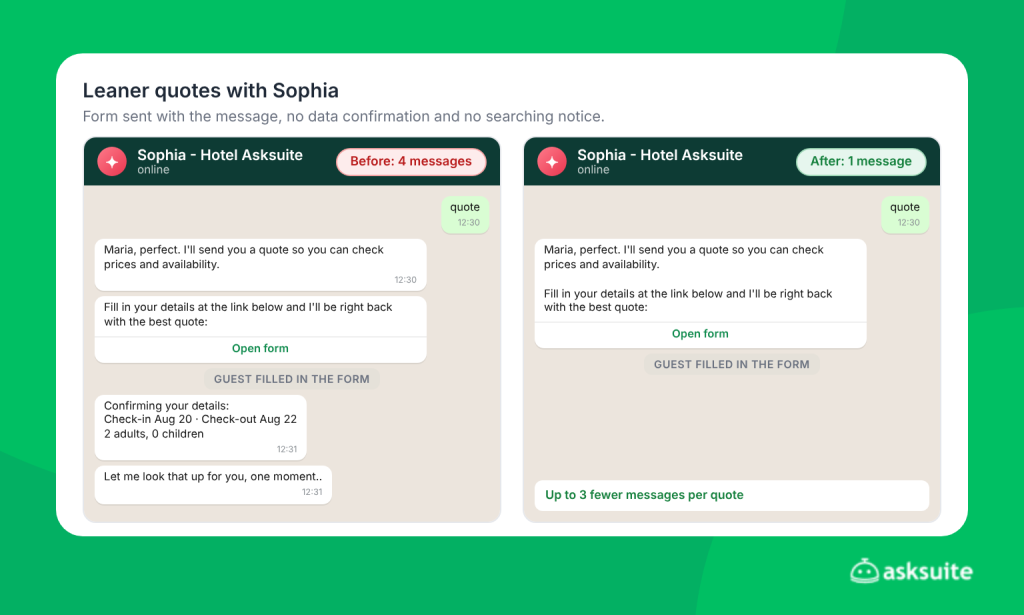
Also, in Flows forms, input errors now show up inside the form itself. Before, if a traveler entered an invalid date, they got an error message, tried again and could get another one. Now they can only move forward after fixing the data, and the hotel no longer pays for all those error messages.
In conversational quotes
In conversational quotes, Sophia collects the details through a natural conversation with the traveler instead of a form. This format also got optimizations:
- Skip lead collection: skips the message asking for the traveler’s contact details and uses the WhatsApp contact instead.
- Skip “Let me look that up for you”: Sophia sends the options right away, without the searching notice.
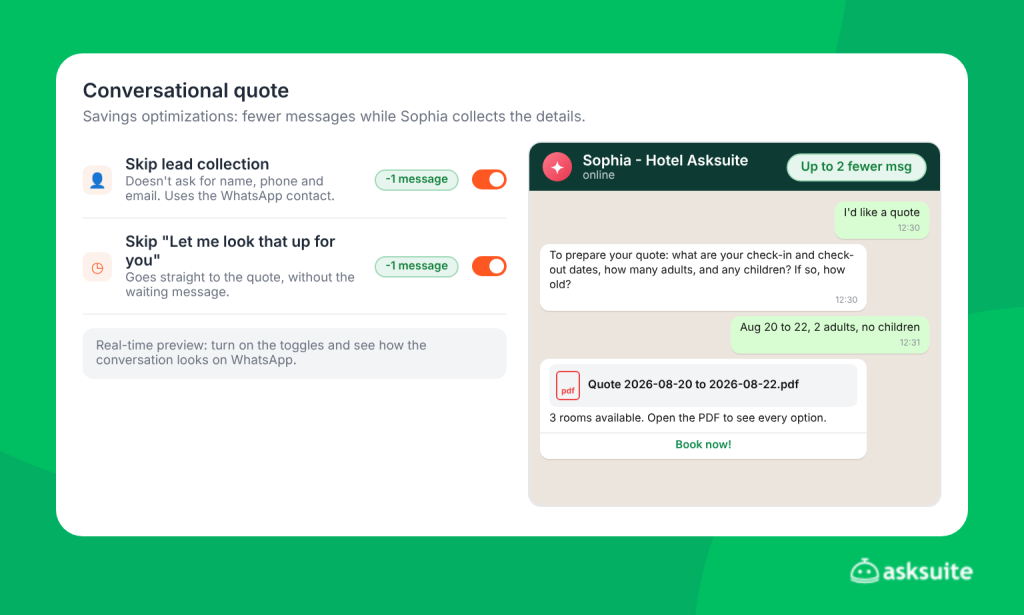
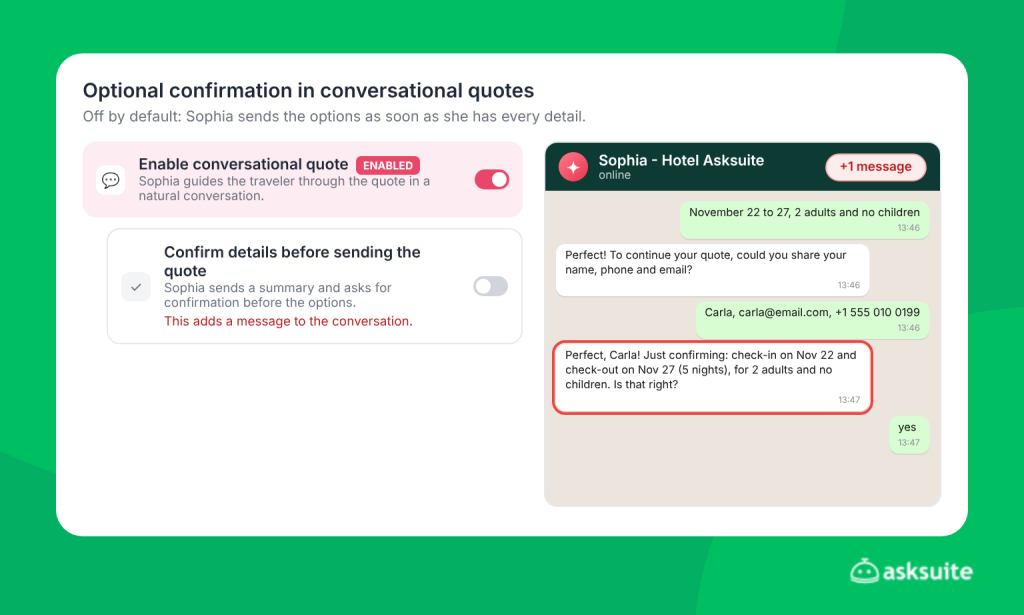
- Optional confirmation: data confirmation is off by default. As soon as the traveler shares everything, Sophia sends the options. If you prefer to keep the confirmation, just turn it on, knowing it adds at least one message to the conversation.
- Fewer questions about children: Sophia only asks about children while another detail is still missing, such as dates or number of adults. If the traveler doesn’t mention children, she moves on without insisting.
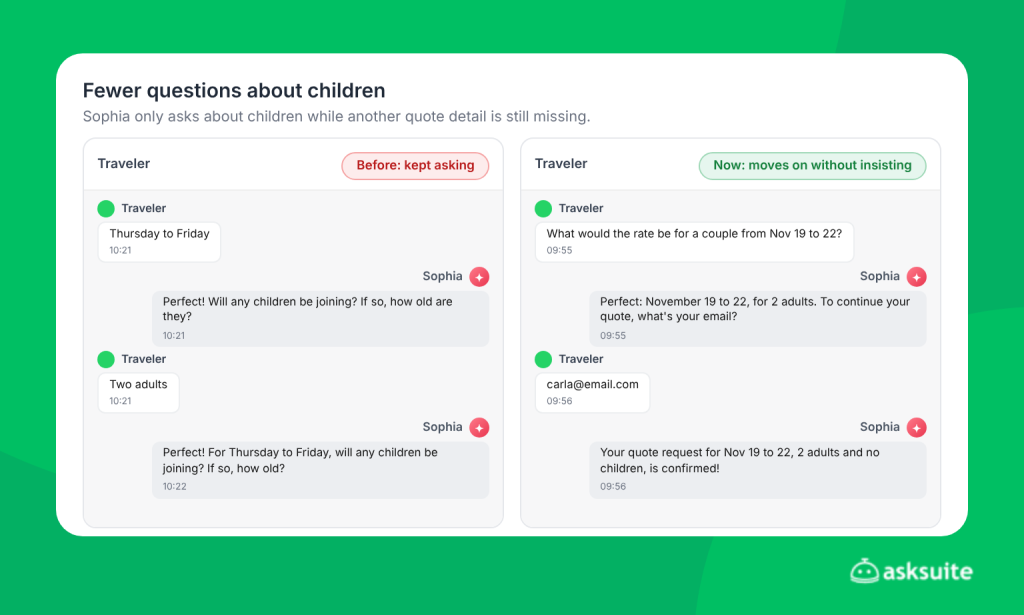
The settings screen itself shows a preview of how the conversation looks with each optimization, so you see the result before turning it on. Learn how to enable conversational quotes.
Tip: if your hotel doesn’t accept children, set this under AI Studio > Quote preferences. Sophia stops asking for the number and ages of children, in both conversational and form-based quotes.
How do you avoid spending credits on conversations that won’t book?
Not every conversation reaching your hotel’s WhatsApp comes from a real traveler. Sometimes the number gets messages from other bots, floods or conversations with no real intent. With the new pricing, every automatic reply sent in those conversations is wasted credit.
Sophia’s Antispam
Every conversation that reaches 20 messages goes through an automatic check. The system combines rules and AI analysis to spot spam, such as one bot talking to another.
When it finds potential spam, Antispam works like this:
- Sophia sends a polite message to the traveler, saying she’s passing the conversation to the team.
- Sophia’s automatic replies are paused in that conversation.
- The conversation is assigned to the “AntiSpam” user, so cases are easy to spot.
- The chat gets the “Human requested” tag, the cue for your team to review it.
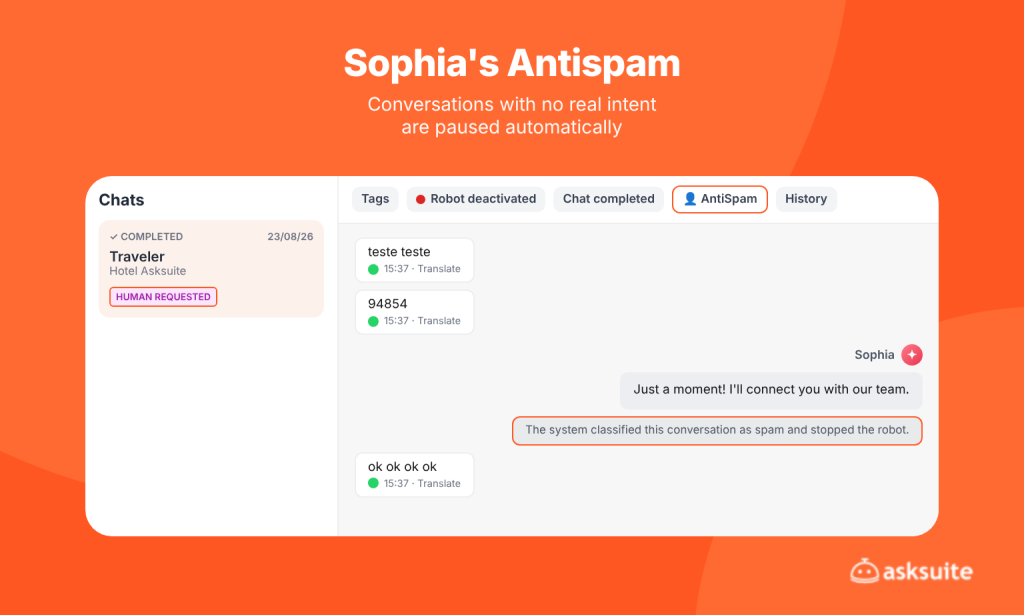
The traveler is not blocked. If your team decides the conversation is legitimate, they can continue the conversation or turn Sophia’s replies back on. Antispam is already on for all clients, on every channel, with no setup needed.
Tags without sending a template
Before, the only way for AskFlow Agents to apply a tag automatically was together with sending a template. In other words, organizing your conversations meant sending a message to the guest.
Now there’s an action just to add or remove tags, without sending any message. You organize conversations in Kanban, prioritize who’s waiting for a reply and keep everything in order without spending credits. See how to automate tags.
How do you make the most of the free 72-hour window?
The Free Entry Point (FEP) is a Meta benefit for conversations that start from a Click-to-WhatsApp ad or a call-to-action button on Facebook or Instagram. If the hotel replies to the first message within 24 hours, Meta opens a 72-hour window in which every message sent to that traveler is free, templates included.
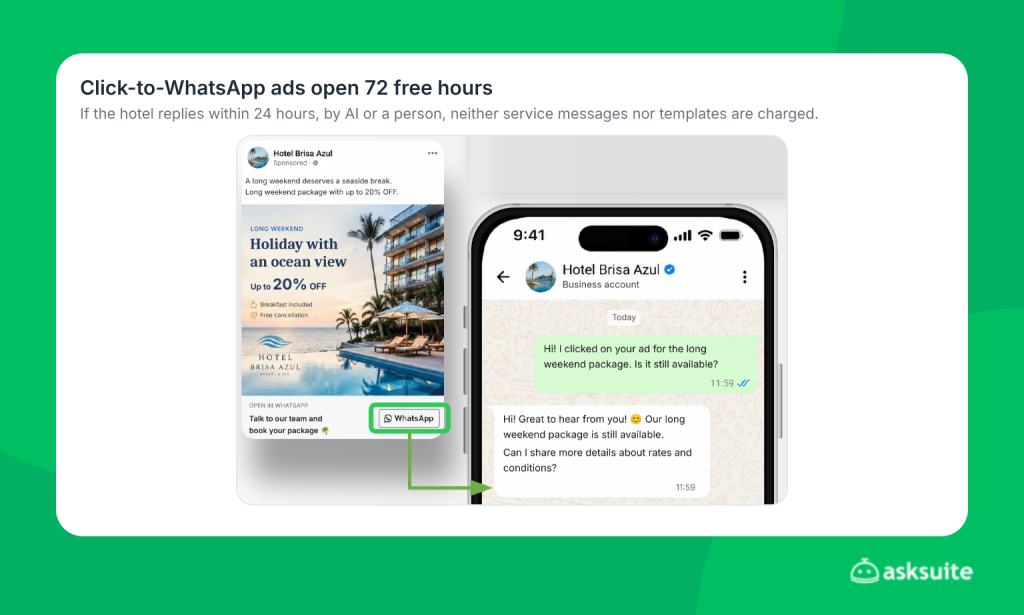
This makes Click-to-WhatsApp ads one of the most efficient ways to use the channel under the new pricing. Today, 55% of Asksuite clients already run this type of campaign to drive direct bookings. To help you make the most of those 72 hours, Asksuite launched two features.
Watch what opens the free window. Only conversations started by Meta Click-to-WhatsApp ads, on Facebook or Instagram, open the FEP. Meta’s logic is simple: if you already paid for the ad, you don’t pay again for the first messages of that conversation. These do not open the window:
- the WhatsApp button on the hotel’s website, even if the traveler reached the site through an ad;
- Google Ads or ads on other networks;
- the Instagram profile button, stories and organic posts;
- conversations started on WhatsApp Web, since the FEP only works in the Android and iOS apps.
Tip: if AI is turned off for ad conversations, use Tag Automation to send the campaign’s first automatic reply. That way you guarantee a reply within 24 hours and open the 72-hour window.
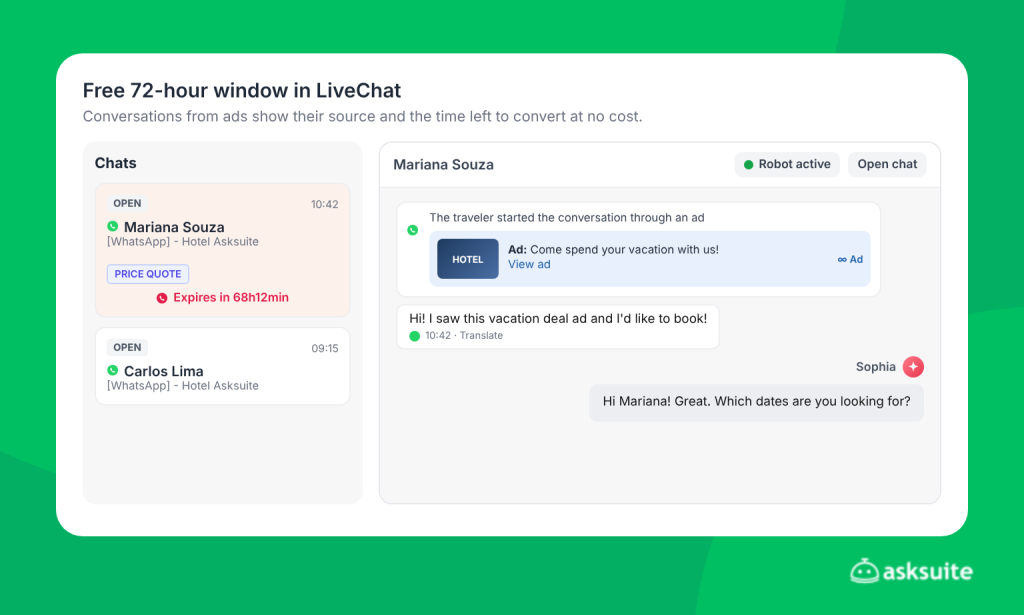
Free window countdown in LiveChat and Kanban
LiveChat and Kanban show, right in the conversation, until when messages to that traveler stay free. With that on screen, your team knows which conversations to prioritize and focuses its sales effort inside the free period.
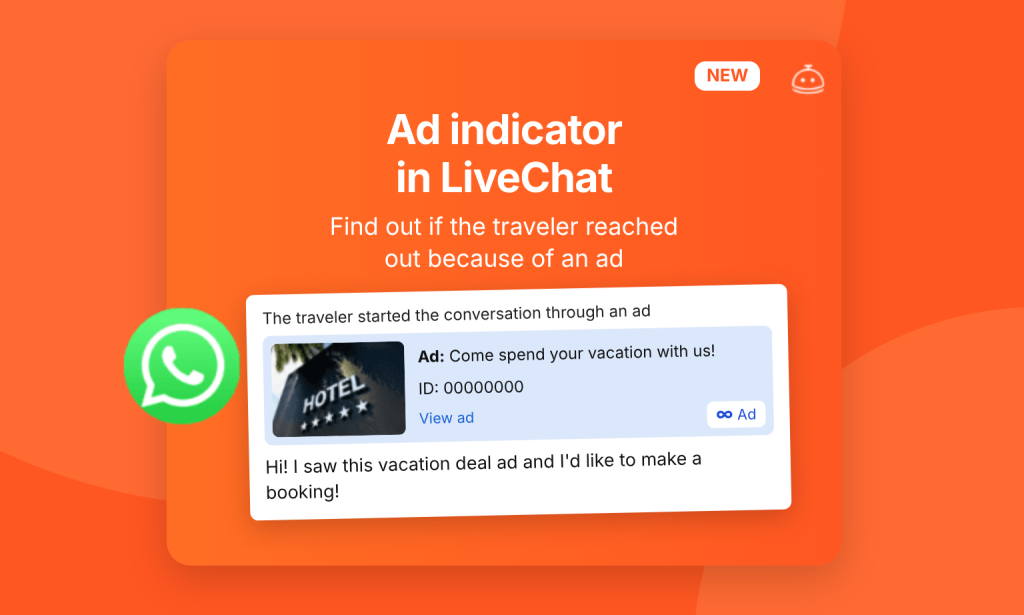
Ad preview in LiveChat
When a conversation starts from an ad, the agent sees a preview of the ad that brought the traveler in: the image used, the source and a link to the original ad. So the conversation starts with context. The agent knows which offer sparked the interest and doesn’t spend messages asking what the traveler saw.
How do you track and control credit usage?
Saving also depends on knowing, in real time, where your credits are going. With service messages now charged, keeping an eye on your balance becomes part of the hotel’s routine. That’s why Asksuite added more visibility for managers and agents.
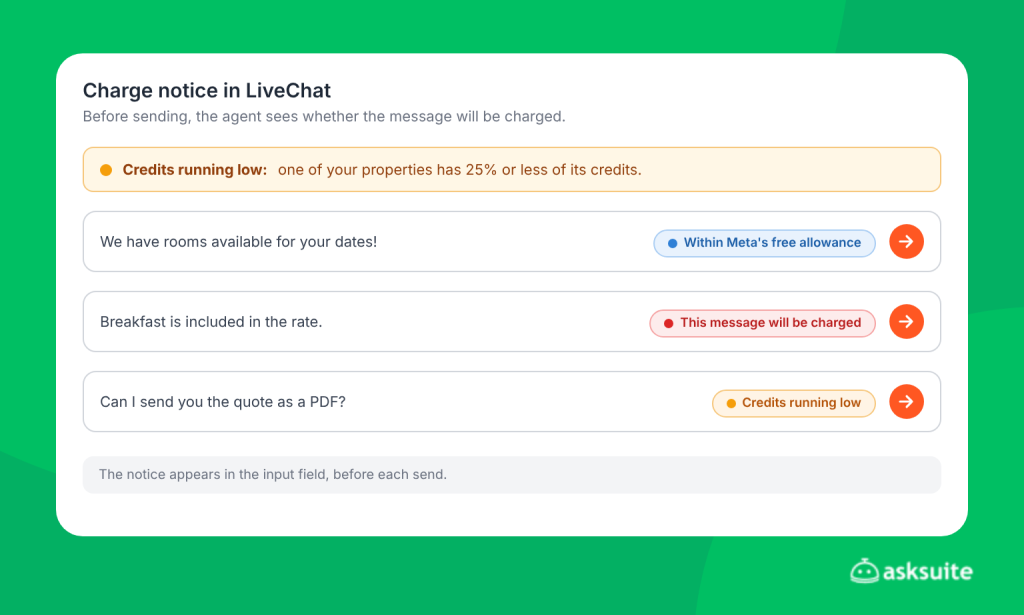
Charge notice before each send
In the LiveChat input field, agents see, before sending, whether that message:
- will be charged and use credits from the balance;
- is within Meta’s free allowance, at no cost;
- or whether credits are running low, so they can alert the manager in time.
This way, your team becomes aware of the cost of each reply while serving travelers and uses Economy Mode more strategically.
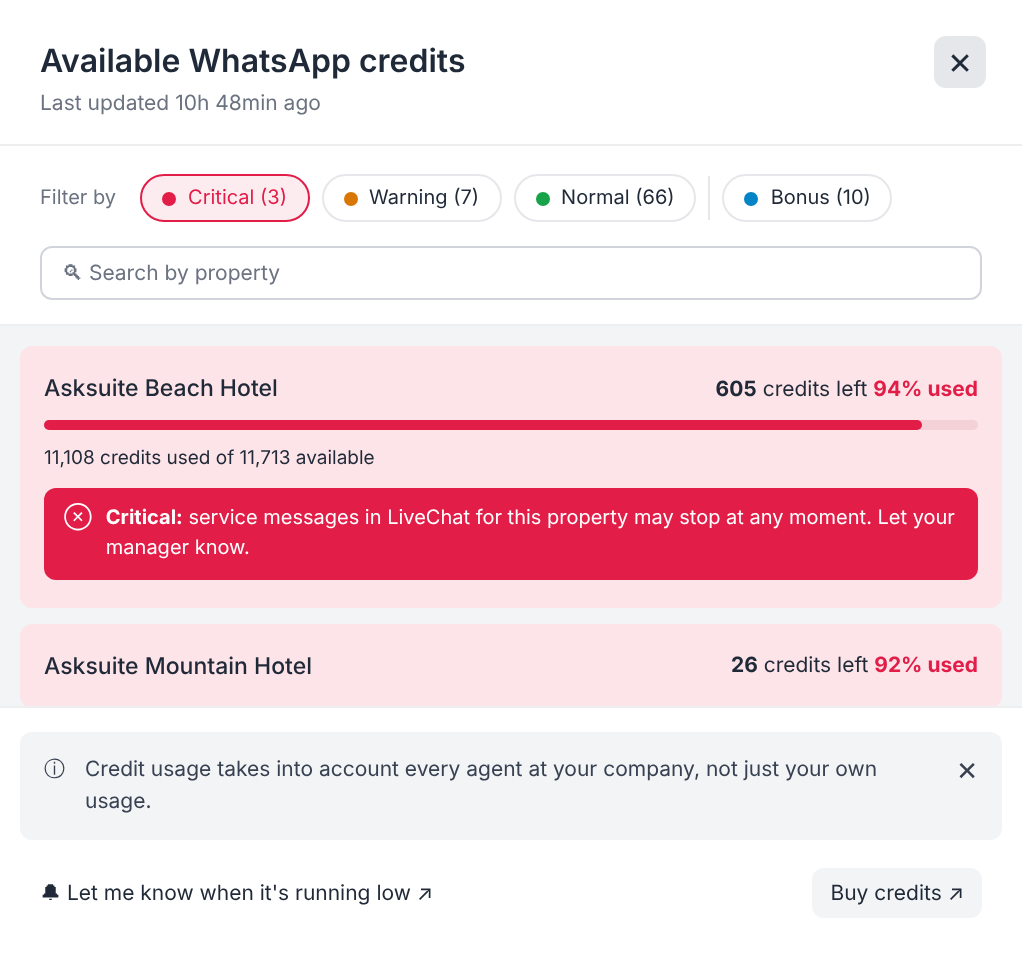
New credit balance window
The balance window, in LiveChat and in the Admin, is now more complete:
- Meta’s free allowance in view: you see how much is left of the month’s 1,000 free service messages before credits start being used.
- Faster reading: colors highlight what needs attention, such as a low balance.
- Priority for hotels that need a top-up: if you manage more than one hotel, the one with the least credit always appears at the top of the list.
Credit report
Under WhatsApp > Credit report, you see usage split by Marketing, Utility and Service, how much comes from your team and how much from AI, and how many messages went out free through the Free Entry Point, with the credits saved.
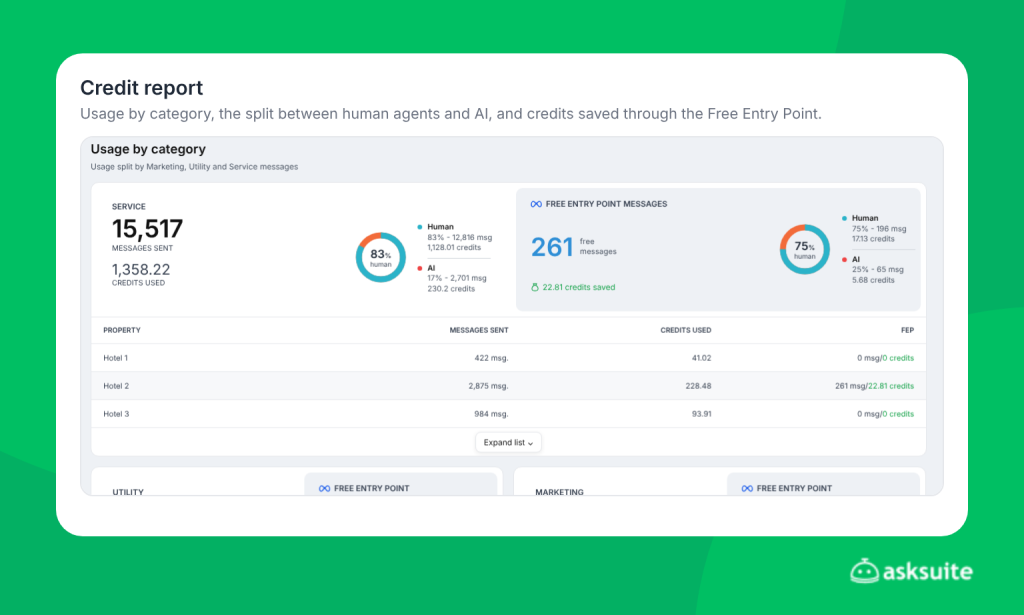
Human agents tend to use more credits. In the real case above, 83% of service message usage came from human agents. If that’s your scenario too, it’s worth making Economy Mode mandatory for your team and letting AI work in your favor.
Automatic balance alerts
A notice appears at the top of every platform screen when any property reaches 25%, 10% or 0% of its credits. That way you top up before the balance runs out, and service to travelers continues without interruption.
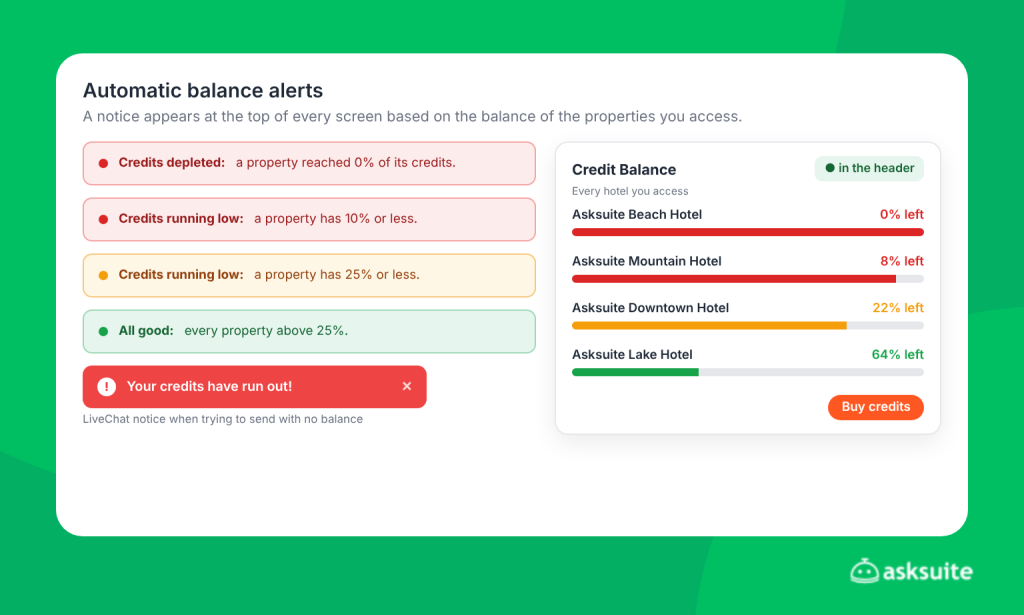
Once 70% of credits have been used, the platform and LiveChat also show a shortcut to the credit store, so a top-up is one click away before the balance becomes a problem.
Template category change alert
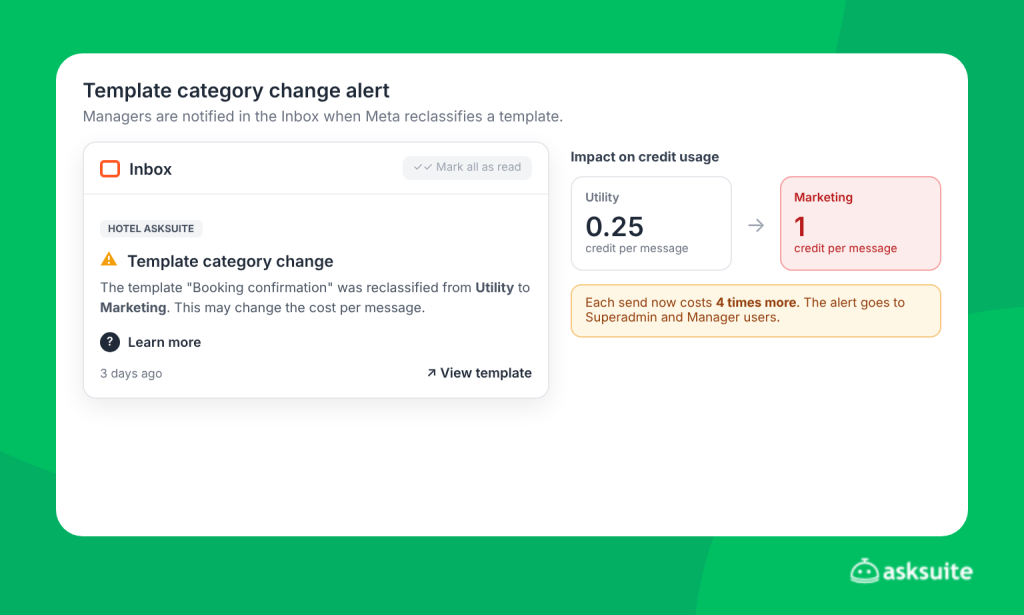
Meta may reclassify a template automatically, for example from Utility to Marketing. Since a Marketing template uses 4 times more credits than a Utility one, this change can weigh on your costs without you noticing. Now, managers get a notification in the platform with the template name, the old category and the new one.
Refunds for undelivered messages
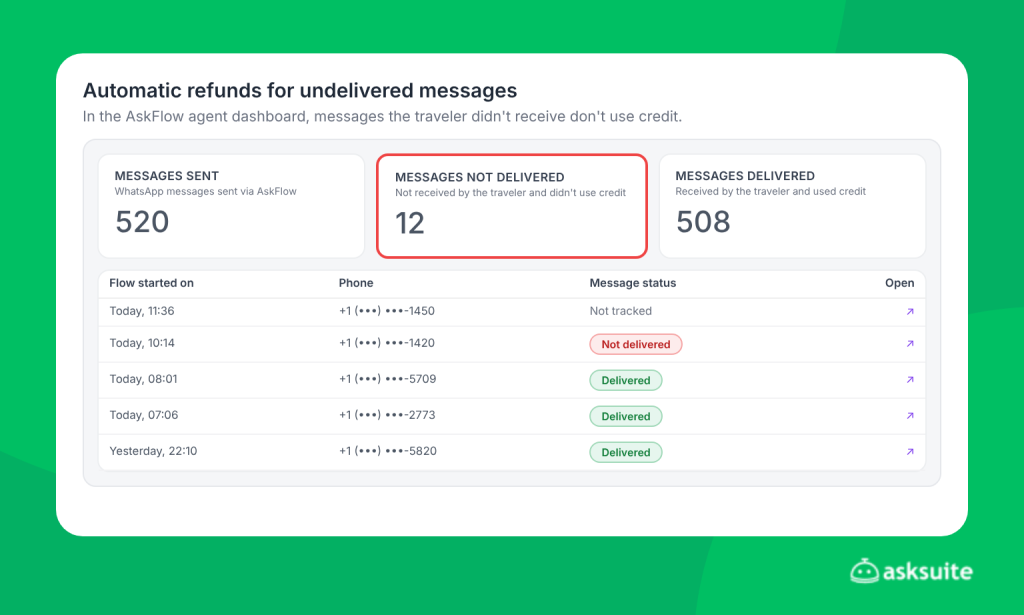
In AskFlow agents, messages that didn’t reach the guest have their credit refunded automatically. You can check the reason for the failure in the conversation and track refunds under WhatsApp > Credit report.
Centralized management for hotel chains
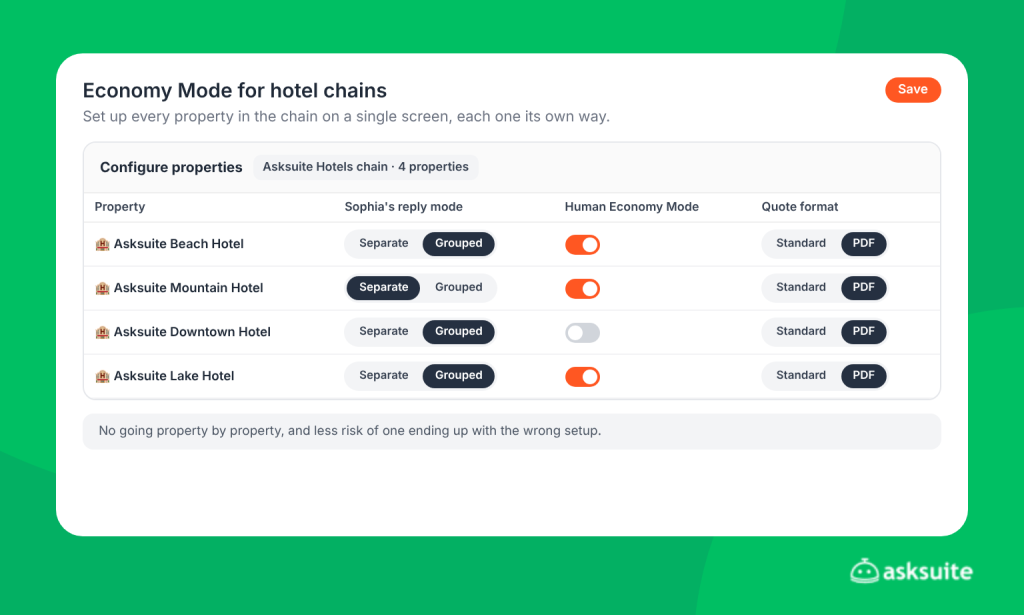
If your hotel is part of a chain, you set up Economy Mode for every property on a single screen, choosing what applies to each one. There’s no need to go property by property, and the risk of one ending up with the wrong setup drops.
Cost simulator
Based on your hotel’s message history, the cost simulator estimates your average cost before and after applying Economy Mode. It’s a good starting point for planning the channel’s budget. The tutorial is at the top of the page.
The calculation takes into account your travelers’ actual countries, since Meta charges different rates depending on the country of the recipient’s number.
Buying credits in the online store
When you need to top up, you buy credits directly in the Asksuite credit store, with no ticket needed. Credits are released right after payment is confirmed, so it’s worth buying ahead of holidays and high season.
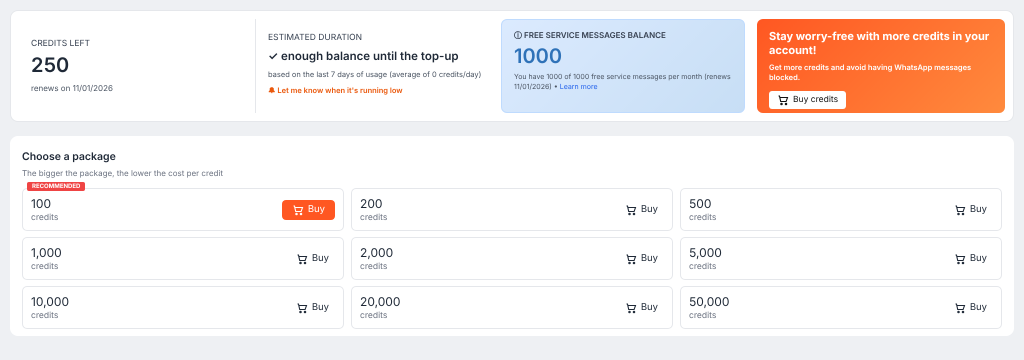
On the same screen, you see a balance duration forecast, based on the last 7 days of usage, and can turn on “Let me know when it’s running low” to get a heads-up before your credit runs out.
Which channel strategies help you save even more?
The features above lower the cost of each conversation. But how you promote WhatsApp also determines how many conversations reach the channel. The idea is to use WhatsApp mainly to drive bookings and serve leads with real purchase intent.
Strategy 1: WhatsApp on conversion pages
If your hotel handles a high volume of conversations, one option is to show the WhatsApp button only on conversion pages, such as the booking engine, landing pages and package or promotion pages.
On the homepage, you keep the Asksuite chat and turn on the post-quote WhatsApp trigger, available for free in the AskStore. That way, travelers are invited to continue on WhatsApp once they’re already at the proposal stage and have shown real interest.
Here, Click-to-WhatsApp ads become even more important, since conversations coming from them stay free for 72 hours.
Expected impact: with WhatsApp only on conversion pages, conversation volume on the channel drops by about 50%, because only the warmest leads come through. With AI and your team in Economy Mode, the increase in credit usage stays between 0 and 30%.
To attract more qualified leads from your ads, you can also use Atlas to improve the quality of your Click-to-WhatsApp campaigns.
Strategy 2: WhatsApp as your main channel, with Economy Mode
WhatsApp plays a key role in direct sales. So, in most cases, it still makes sense to keep it as your main channel, with the floating button on the homepage. If your goal is to capture as many leads as possible, keep WhatsApp front and center and use Economy Mode for AI and your team.
Strategy 3: floating button with a lead capture form
A middle ground is to keep the floating WhatsApp button on the homepage, but with a quick form before the conversation, asking for name, email and WhatsApp. The expected reduction is 30% to 70% in the number of people who start a conversation, filtering for real interest while still capturing the lead’s contact.
AskFlow Agents triggers within 24 hours
If your hotel uses AskFlow Agents for follow-ups, review your send triggers. A message sent within 24 hours of the traveler’s last message is charged as a service message, which costs much less than a template. Adjusting sends to that window lowers the cost of every follow-up.
Telegram as a complementary channel
Telegram is already available in the Asksuite Omnichannel, exclusively for WhatsApp Performance Suite clients. You can offer it on your homepage alongside the chat and even use WhatsApp to redirect travelers there. Nothing changes for your team: conversations from both channels are unified in one place.
Telegram works well for post-sale communication and in-stay service. One limitation: it doesn’t allow outbound messages, so we recommend keeping WhatsApp alongside it in the Omnichannel.
Adjust your strategy by season
You don’t need to pick one strategy for the whole year. In low season, it’s worth promoting WhatsApp more to capture leads, as in strategy 2. In high season, when the hotel is usually fuller, you can limit the channel to conversion pages, as in strategy 1.
Checklist: is your hotel already saving?
Use this list for a quick check of your WhatsApp operation:
- Is Economy Mode for your team set as mandatory?
- Is Sophia’s Economy Mode set to group replies into one message?
- Do you run Click-to-WhatsApp ads to take advantage of the free 72-hour window?
- Is there a Tag Automation for each ad, guaranteeing the first reply?
- Does your team use LiveChat Kanban to track ad conversations and the window’s expiration?
- Does your team reply within the 72-hour window to convert?
- Does WhatsApp appear only on conversion pages, such as landing pages, the booking engine and promotions?
- Is Telegram integrated as an alternative channel?
- Do AskFlow Agents triggers send within 24 hours of the traveler’s last message?
If most of your answers were “no”, your hotel may be spending more credits than it needs to.
Summary: what’s already on and what you can set up
| Feature | How it lowers costs | Needs setup? |
|---|---|---|
| Economy Mode for your team | Groups text and images into a single send | On by default, can be locked by the manager |
| Sophia’s Economy Mode | Answers several questions in one message | On by default, adjustable |
| Traveler message grouping | One reply for up to 5 messages in a row | No, already on |
| Quote and carousel as PDF | One send instead of several | On by default, adjustable |
| Quote optimizations | Up to 3 fewer messages per quote | Yes, under WhatsApp > Optimizations |
| Errors inside Flows forms | Avoids repeated error messages | No, already on |
| Antispam | Pausar respostas em conversas falsas | Não, já está ligado. |
| Etiquetas sem modelos | Organiza conversas sem enviar mensagens. | Sim, nos agentes AskFlow. |
| Janela de 72 horas e pré-visualização de anúncios | Ajuda você a vender durante o período gratuito. | Não, já está ligado. |
| Alertas e aviso de cobrança | Mostra o uso em tempo real. | Não, já está ligado. |
| Simulador de custos | Estimativa de custos antes e depois das otimizações. | Não, disponível no painel de administração. |
| relatório de crédito | Mostra a quem pertencem os créditos: à equipe ou à IA? | Não, disponível no painel de administração. |
A nova política de preços da Meta altera o custo do WhatsApp, mas não o valor do canal para as vendas diretas do seu hotel. O que muda é a forma como você o utiliza: cada mensagem precisa ser mais eficiente.
E os cálculos comprovam. Em um caso real, o custo adicional da Meta representou cerca de 1% do valor médio de cada reserva. Enquanto isso, uma reserva feita por meio de uma OTA, com uma comissão de 25%, custa ao hotel um quarto do valor dessa reserva. Em outras palavras, manter apenas duas reservas diretas já cobre todo o aumento.
Com o Modo Econômico, orçamentos mais enxutos, proteção antispam e visibilidade do uso de créditos, o Asksuite já oferece grande parte dessa eficiência automaticamente. Adicione as estratégias de canal e você terá controle total sobre o custo do WhatsApp para o seu hotel.
O próximo passo é revisar a tela WhatsApp > Otimizações e usar o simulador de custos para ver o impacto no seu volume. Se tiver dúvidas, entre em contato com a equipe de Sucesso do Cliente ou envie um e-mail para support@asksuite.com.
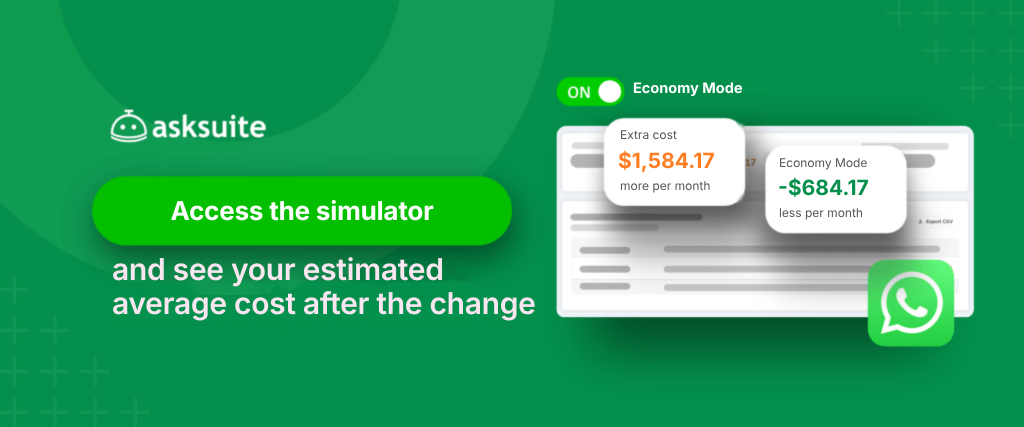
Acesse o simulador de custos aqui e veja seu custo médio estimado, antes e depois do Modo Econômico.