4.9/5
4.9/5  HotelTechReport - with +970 verified reviews

With automatic updates, you decide how often Sophia re-reads your hotel’s pages. She always answers with the most recent version. Available now, free for all clients.
The offers page changes. The restaurant menu changes. The events calendar changes. One campaign goes live, another comes down.
The more your hotel uses Sophia, the more of this living content becomes part of her knowledge base. And living content has one inconvenient trait: it goes out of date.
The conversation about AI agents in hospitality has moved past “can AI answer this?”. The question that matters now is a different one: “can I trust what it answers?”. And the answer to that question isn’t in the AI model. It’s in how current the information behind it is.
That’s exactly where today’s release comes in.
Introducing automatic updates
You could already feed Sophia with the content of a page from your website using the Extract link data option in Data source. Until now, that reading happened only once.
From now on, you set an update frequency for each piece of content created by link. The platform accesses the page again at the interval you configure, performs a new extraction, and Sophia starts answering with the most recent version.
No one has to remember. No one has to redo anything.
You set the rhythm for each piece of content
The frequency is chosen content by content, between updating every 24 hours, 7 days, 30 days, 90 days or 365 days.
And it makes sense that way. An offers page running continuous campaigns doesn’t change at the same pace as an institutional news page, and a hotel services page changes even less. The scale runs from one day to one year precisely because dynamic content and institutional content live side by side in the same knowledge base.
And you can change the frequency, or disable it, whenever you want. Nothing needs to be re-created.
And how long it stays valid
On top of the frequency, you can set an expiration date for the content.
Once that date arrives, Sophia stops using that content as an information source. If you don’t set a date, it stays active.
In practice: a seasonal campaign goes out of circulation exactly when it should, without depending on someone remembering it mid-week.
And you can follow the whole cycle from the list
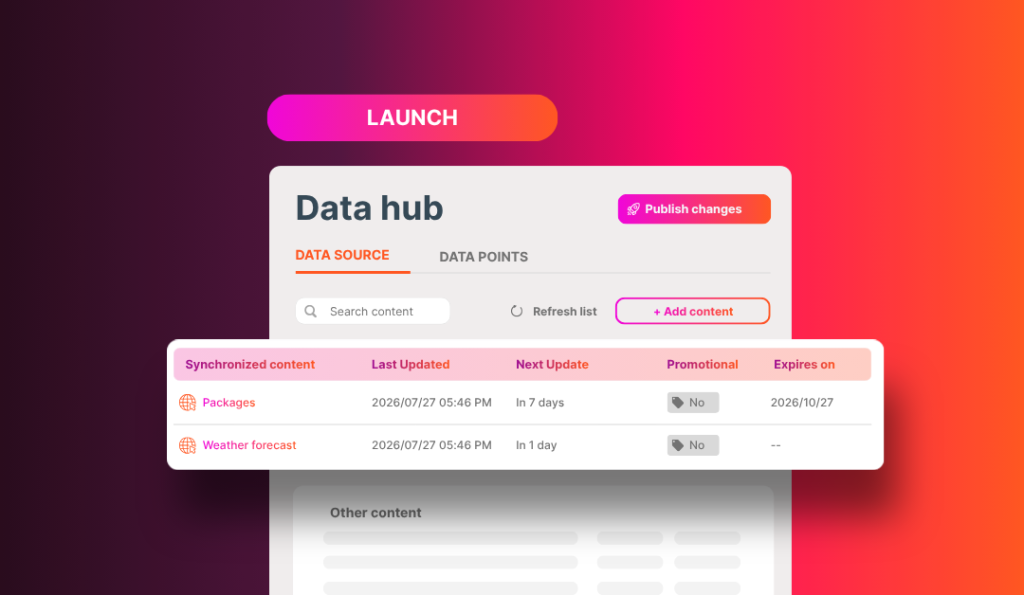
Your knowledge base now organizes content into two sections: Synced content, covering everything with automatic updates configured, and Other content.
In the synced list, each piece of content shows:
- Last update: the date and time of the last extraction performed
- Next update: when the next one is already scheduled
- Expires on: the expiration date you configured
And if you need an update outside the cycle, manual updating is still available at any time, even with automatic updates switched on.
What you gain
- Less manual maintenance work. The recurring task of re-extracting links becomes a rule you configure once.
- A knowledge base that stays current. What Sophia knows follows what’s published on your pages.
- More reliable dynamic information. Offers, promotions and campaigns are no longer at risk of being shared after they’ve expired.
- Control in your hands. Frequency and expiration are your decisions, set content by content and changeable whenever you want.
- Visibility of the cycle. You can see when the last update happened and when the next one is due, without having to ask anyone.
- Content that used to be left out. That menu that changes every week and that calendar that changes every month can finally live in the knowledge base without becoming a maintenance routine.
How hotels around the world are already using it
Two different rhythms in the same hotel
A luxury resort in Switzerland set its offers page to update every 7 days and its institutional news page to update every 30 days. The first keeps up with campaign rotation. The second keeps up with announcements about new services, experiences, restaurants, events and awards.
“It will be a game changer!” (feedback from the luxury resort in Switzerland)
Offers that are always current
A hotel in Gibraltar set its offers page to update every 7 days. Every campaign that goes live becomes available for Sophia to share with travelers.
This week’s menu, right in the conversation
A hotel in Bahia, Brazil, created content from its restaurant menu page with updates every 7 days. The traveler asks what the restaurant is serving and gets what’s actually on the table.
Information that isn’t even from the hotel’s website
The URL doesn’t have to be yours. A resort and spa in Costa Rica and a hotel group in Brazil both created content from weather forecast pages, updating every 24 hours.
For the Brazilian group, the decision came from their own data: a guest survey showed that weather was among the most frequent questions. The answer now lives in the knowledge base, and it updates itself every day.
“I thought it was excellent. I’d been waiting for this update feature!” (feedback from the hotel group in Brazil)
Before you set it up, worth knowing
- Automatic updates are available for content created through the Extract link data option.
- The URL must remain accessible for new extractions to run.
- It works for new content as well as content already in your knowledge base. For the ones already there, you just need to configure the update rule.
💡 Tip: go for pages that cover a single topic. This improves extraction quality and the accuracy of Sophia’s responses.
Available now, at no cost
Automatic updates are already live for all Asksuite clients, at no additional cost and with nothing to purchase.
Visit the Help Center and see how to set it up →
And this is just the beginning
This is the first Sophia 2.0 feature to reach you.
Keep an eye out. There’s more coming.